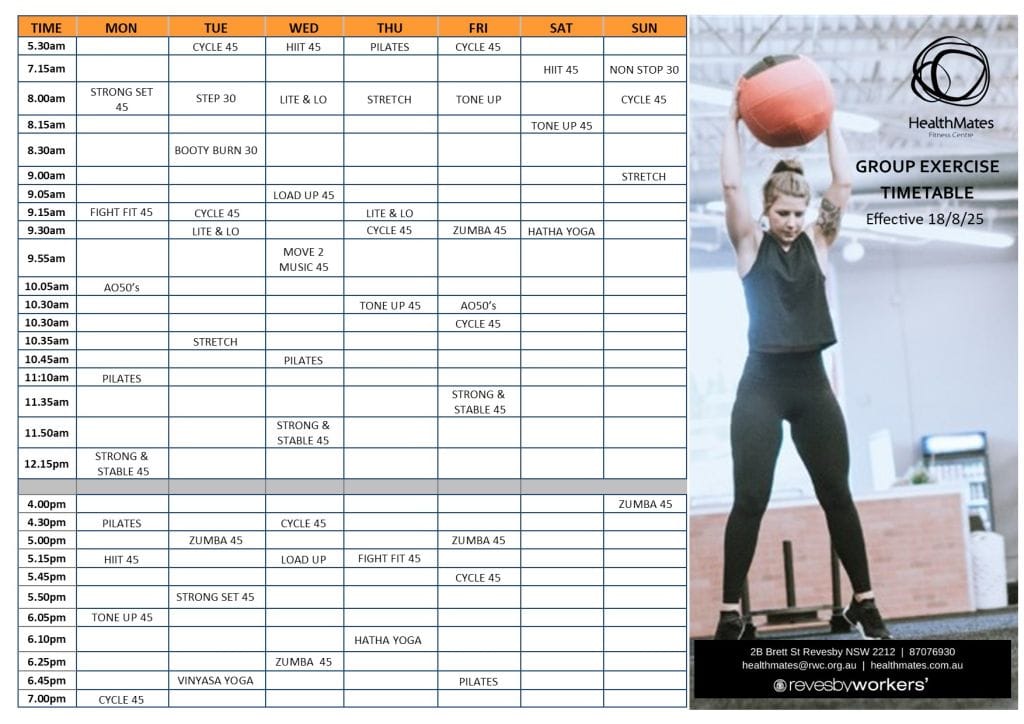
Classes & Booking
How to book a class
Prior to booking your first class
- Contact us at Health Mates to create your account.
- Confirm your account via the email you will be sent. If you didn’t receive the email check your spam account.
- Download our free Health Mates App or use the log in details you just created to book your classes on the website
To book a class using app
- Open our app
- Click on Class Timetable
- Scroll to date you want to attend (across the top) and click it
- Scroll down to find your class
- Select ‘BOOK’
To book a class using website
- Click on book a class button above
- Find the class you wish to book
- Select book
- Use your My Wellness log details to finalise booking (save your log in details to your PC so easy to remember next time)
How to cancel a class
To cancel a class using app
- Open our app
- Click on Class Timetable
- Scroll to the date and class you had booked
- Select ‘DELETE BOOKING’
To cancel a class using website
- Click on book a class button above
- Log in at the top right hand corner with your My Wellness log in details
- Select the 3 lines to the side of your profile picture
- Select class schedule
- Find the class you book and select delete booking
General Information
Waiting list
- If the class is full you can elect to go on the waiting list.
- Everyone on the waiting list, regardless of your position number, will receive a notification if a place becomes available (ensure your notifications are turned on).
- If you receive a notification and wish to take the vacancy find the class in your app and select ‘BOOK’.
Booking guidelines
- Bookings will open at 8am one day prior to the day of the class.
- If you ‘FOLLOW’ a class you will get a reminder when the bookings are open (ensure your notifications are turned on). Once bookings are open you will still be required to book your position.
Cancellation policy
- Please cancel your booking as soon as you know you won’t be attending. We ask that you please respect others who are keen to get a place in classes.
- Cancellations can be made up to 2 hours prior to your class start time via your app. This allows time for others to take your place.
- If you do not provide 2 hours’ notice or do not turn up for a booked class you will receive a penalty.
- Penalties stay on the system for 15 days.
- If you receive a second penalty you will forfeit your privilege to book classes for 7 days. This does not mean you can’t attend, just that you won’t be able to reserve a spot. If you come along and there is a vacancy advise your instructor and you will be able to participate.